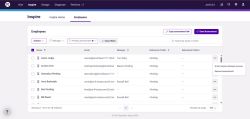
Update software to have a quick resend assessment button
Please see the attached screenshot. The column of Inspire Access should be changed to a "resend the assessment" button. Far too easy for clients to mistakenly invite people to the software. Additionally, it would make more sense to be able to quickly send out the assessment again.

Comments: 3
Oldest
•
Newest
•
Most likes
•
Fewest likes
-
20 Mar, '25
Meggan FlahertyIt is critical to make this experience easier for clients to also resend the assessment in bulk - especially for large rollouts
-
23 Sep, '25
Becca VanDerveerHad another call with a client about this today. Currently, to resend assessments you have to go into Org Settings → Employee Access Data → search for the person → click the three dots → then resend. This process feels unintuitive, is hidden deep in the settings, and takes several extra clicks for what used to be a quick, common action.
Previously, we had a visible button accessible from the dashboard, which made this action much faster. Moving this behind multiple clicks adds unnecessary friction and creates frustration for clients. It would be helpful to have a “Resend Assessment” button accessible directly from the dashboard or employee record view. This would improve usability and reduce the risk of users getting lost in the settings. -
24 Feb
Joe Kirschbaum AdminWe have adjusted the Inspire Employees grid to better align with how our users interact with the product. We have removed the Inspire Access column from the grid, and included a Resend assessment option in the 3 dot menu next to the employee record. See attached screenshot for reference.